Crowdpass RFID & NFC SOLUTIONS

Integrate  
with NFC AND RFID TECHNOLOGY  

Powered by

Crowdpass logo featuring a stylized circular shape in shades of blue followed by the word 'crowdpass' in lowercase white font.
CrowdPass event software pairs with CrowdSync wearables for seamless access control, data capture and real time analytics

Wearables that work smarter

White RFID wristband with multiple crowdpass logos and QR codes printed along its length, featuring a white plastic clasp.
White line icon of a magnifying glass over a light bulb with glowing rays, alongside ascending bar chart columns.
Enhance Insights
  • See peak times for check-in
  • Understand what artists/performer were most popular
  • Determine which areas to place concessions, booths and more
White magnifying glass icon with a person wearing a fedora hat, sunglasses, and a partial beard inside the lens, representing a detective or spy concept.
Eliminate Fraud
  • RFID wearables cannot be duplicated
  • Quick deactivation of any misplaced wristbands
  • No pass-alongs of wristbands possible
White line art of a megaphone emitting sound waves toward three user icons representing people.
Increase Engagement
  • RFID allows for seamless integration of brand engagements
  • Effortless for attendees (almost) and super quick
  • Quick tap to access certain event
    attractions & interact with sponsors/
    vendors
White stopwatch icon with motion lines indicating speed or fast time.
Reduce Lines
  • Check in attendees into main entries and access points in under one second
  • Streamline VIP activations

Seamless Check-ins and Access Control

With our RFID CrowdReader and Mobile Scanners, average check-in times are 3-4x times faster than standard check-in processes

SPECS
  • Set up scanners at different event areas for increased security, data tracking, and special activations
  • Restrict access to certain ticket levels / groups
  • Allow real-time VIP upgrades
Two images side by side showing wristband scanning; left shows a person attaching or checking a wristband on another person's wrist outdoors, right shows a close-up of a wrist under green light scanning on a device indoors.
A black CrowdsPass device with a glowing green circular logo above a smartphone screen that shows an attendee check-in confirmation for Arlene Pena at Entry Gate East with a large checkmark and the text 'Checked In'.A black CrowdPass device with a glowing red circle icon and the text 'Incorrect Credential Access is Denied' above it, and below, a smartphone screen showing a red alert message: 'Entry Gate East, This Attendee Can't Access This Zone. We couldn't match this QR code with any of the approved attendees. Try Again.'

Receive High-Level and Area-Specific Data

Navigate various dashboards with deep audience insights to optimize in real time and at future events.

SPECS
  • Understand what breakout sessions  were most popular
  • Determine the best areas to place concessions, booths, and more
  • View peak times for check-in/entry and highest trafficked gates
  • See exact traffic in areas to sell prime real estate to sponsors & vendors for following years/events
  • Discover demographic trends amongst attendees, for future marketing efforts
Dashboard showing event attendance details for NY TechWeek Stealth Startup Soft Launch Party on June 5, 2024, including venue check-in data with 133 of 896 attendees present, 161 total entrances, and a line graph of venue gate traffic over time. The interface lists attendee visits with details such as name, email, group, company, job title, visit count, gate used, check-in method, and timestamps.
CROWDPASS PLATFORM FEATURES

CrowdPass Attendee Registration Process

We make the event registration process easy. It only takes a few minutes to complete - why overcomplicate it?

Step 1
Receive an Invite
Attendees with receive an invite in their email or text & will click the link to register.
Gray dashed curved arrow pointing down and to the left.
Step 3
Receive a QR Code
Upon approval, each attendee will receive a QR code that can be used to enter the event.
Gray dashed curved arrow pointing to the upper right.
Step 2
Complete the Form
Attendees follow prompted questions to complete the registration process.

Ticketing

Sell tickets instantly and integrate them with attendees profiles so that they can scan to check-in. Receive payments instantly with our Stripe Connect integration!

  • Create ticket types or tiers
  • Set prices and available quantities
  • Set sale dates
  • Track sales on the CrowdPass dashboard
Two wristbands, one white and one black, both branded with 'crowdsync' and a circular logo above a smartphone screen displaying a digital ticket with a QR code, ticket details, and prices on a dark concentric circle background.

Food & Beverage & Merch Tokens

Set redeemable tokens for certain access levels or ticket packages

Customize how many tokens attendees receive at different areas / for different items

Attendees simply tap their wristband on one
of our CrowdReaders to redeem a token

Light up in Green
=
Token available
Gray horizontal arrow pointing right with a simple triangular arrowhead.
Use token
Light up in Red
=
No tokens available

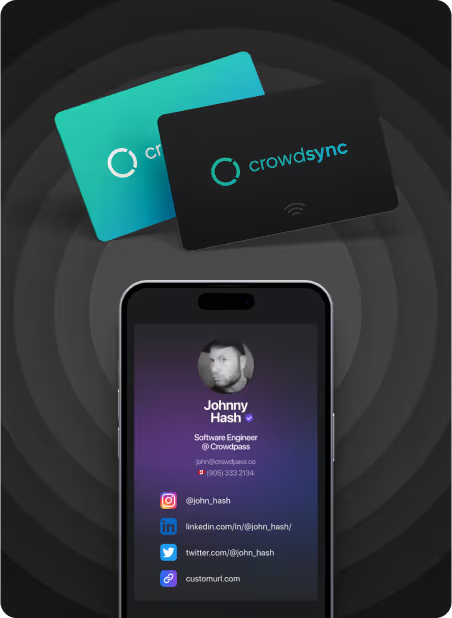
Digital Contact Cards & Lead Retrieval

  • Share a contact with a simple 'tap'
  • Sort contacts into lists to stay organized
  • Export lists to contacts & get networking!
  • Attendees can easily create and manage their digital contact cards all via mobile web browser (no app required!)
Digital business card displayed on a smartphone screen showing Johnny Hash's photo, name, job title as Software Engineer at Crowdpass, email, phone number, and social media icons with usernames for Instagram, LinkedIn, Twitter, plus a custom URL; two physical Crowdsync cards, one teal and one black, are shown above the phone on a dark, concentric circle background.

CrowdTag Products

Our NFC Chips Can be incorporated in any of our LED products.
Festival Band

Our festival wristband is equipped with NFC technology, allowing for seamless access control and customized experiences, and features an adjustable cloth strap for comfortable and secure wear throughout the event.

Black wristband with an empty rectangular plate attached to it, displayed on a white background.
Silicone Adjustable Band

This wristband is equipped with NFC technology, offering personalized experiences and easy access control, and features an adjustable design for comfortable and secure wear.

Three wristbands in white, black, and dark gray colors laid flat, each with the Crowdsync logo and name printed on the longer section.
Lanyard + Badge

This NFC enabled badge is not only fully customizable but also comes with a customizable lanyard, offering a complete solution for seamless access control and personalized identification needs.

Two event badges hanging by black lanyards; the left badge is teal with white text showing 'crowdsync,' 'ACCESS LEVEL General Admission,' and the date 'JUNE 20TH 2023,' the right badge is light teal with white text showing 'crowdsync,' 'ACCESS LEVEL VIP,' and the date 'JUNE 20TH 2023.'
Silicone Adjustable Band

This wristband is equipped with NFC technology, offering personalized experiences and easy access control, and features an adjustable design for comfortable and secure wear.

Two silicone wristbands stacked, one white and one black, each printed repeatedly with the word 'crowdsync' and a circular logo in teal and black.